Optimizing Email Delivery
When using BlueVenn's integrated email communication tool, i.e. the SendGrid channel, you can customize your delivery options by optimizing send time or deferring delivery to local time.
Note: The optimization feature must be enabled in CampaignManagementSettings by setting the EnableSendTimeOptimisation property to true. By default it is off.
-
Open or create your campaign and add a communication step as normal.
-
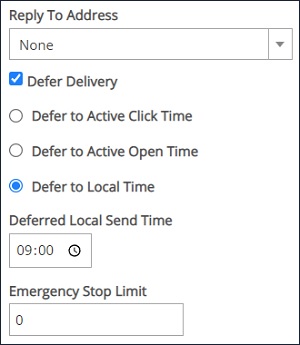
In the properties pane of your email channel, select the defer delivery checkbox.
-
For email delivery optimization, select if you wish to defer delivery to active click time or active open time.
-
For email delivery localization, select to defer to local time and enter a local send time.
-
Continue to build your campaign and run as normal. Emails sent when the campaign runs will use the selected delivery options to defer communication delivery.